What Are UTM Parameters?

What Are UTM Parameters? A Simple Guide to Tracking Links
In the vast, ever-expanding world of digital marketing, generating traffic is only half the battle. The true victory lies in understanding where that traffic comes from and, more importantly, what it does once it arrives. Without this visibility, marketing efforts are essentially shots in the dark. Millions of dollars are spent annually on campaigns across social media, email, paid search, and affiliate programs, yet many businesses struggle to definitively answer one simple question: “Which channel or specific campaign generated this customer and this revenue?”
The common challenges without proper link tracking are significant. Marketers rely on generic data, leading to misallocation of budget, inaccurate ROI calculations, and an inability to scale successful initiatives. A post on Facebook might drive traffic, but was it the standard organic post, a paid ad, or a link shared in a group? A high-performing email might be successful, but was the click-through rate driven by the header banner, the call-to-action button, or a text link deep in the email body?
This ambiguity is precisely why UTM parameters were created. They are the essential tool that transforms a generic click into a rich, detailed data point. By adding a simple string of text to your URLs, UTMs allow you to meticulously label your traffic, giving your analytics platform the necessary context to attribute conversions, revenue, and user behavior with surgical precision.
In this comprehensive guide, you will learn everything about UTM parameters: what they are, the role of each of the five core parameters, how to build them, and the best practices for using them consistently to unlock superior marketing intelligence.
What Are UTM Parameters?
UTM parameters, short for Urchin Tracking Module parameters, are simple snippets of code appended to a URL to help track the performance of a digital marketing campaign. They are the industry-standard method for passing critical information about a click directly into an analytics platform, such as Google Analytics.
The core purpose of using them is campaign attribution. When a user clicks a regular, untagged link, the analytics platform often only knows the referrer—the website the user came from. If they came from Facebook, all you see is “facebook.com.” If they came from an email, you might see “direct” or the email provider’s domain. This lack of detail makes optimization difficult.
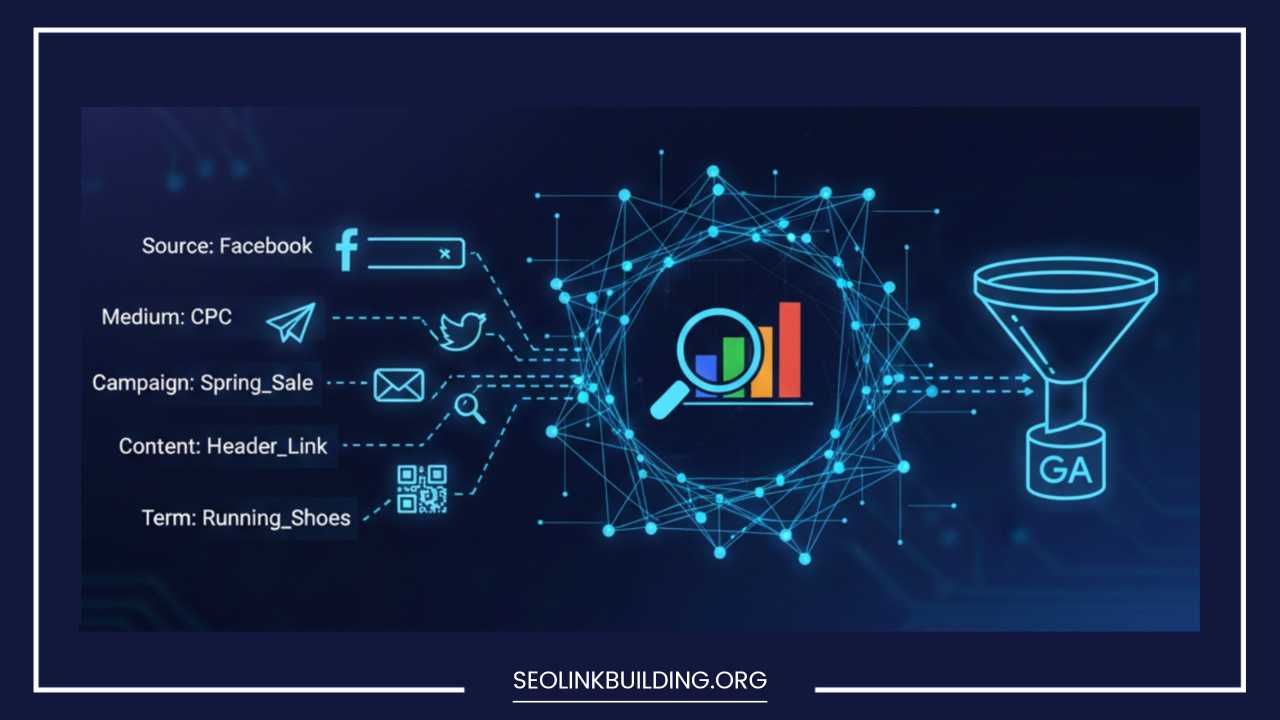
UTM parameters solve this by allowing the marketer to label five specific attributes of the click: the source of the traffic, the medium used, the campaign it belongs to, the term used, and the specific content that was clicked.
Anatomy of a UTM-Tagged URL
A regular URL looks like this:
https://www.example.com/product-page
A UTM-tagged URL looks like this:
https://www.example.com/product-page**?utm_source=facebook&utm_medium=social&utm_campaign=spring_sale&utm_content=carousel_ad**
The parameters are always added after a question mark (?) and are separated by an ampersand (&). When a user clicks this tagged link, the UTM information is recorded by the analytics platform before being stripped away, allowing the platform to categorize the session accurately under the specific campaign labels you defined. This detailed breakdown is the foundation for all modern data-driven marketing decisions.
History & Origin of UTM Parameters
The history of UTM parameters is closely tied to the history of digital analytics itself. The term “UTM” stands for Urchin Tracking Module, a direct reference to the company Urchin Software Corporation. Urchin developed the foundational web analytics software that used these parameters to track and report on traffic sources.
In 2005, Google acquired Urchin Software Corporation. This acquisition formed the basis of what eventually became Google Analytics (GA). Although Google Analytics has undergone numerous iterations, from the classic version to Universal Analytics (GA3) and the current Google Analytics 4 (GA4), the fundamental method for external link tracking—the UTM parameter system—has remained virtually unchanged.
The naming of the parameters (e.g., utm_source) is a direct legacy of the Urchin platform. Their robust design and simplicity meant that the system was universally adopted not just by Google Analytics, but by virtually every other major analytics, marketing automation, and CRM platform, making UTMs the single most essential and enduring standard for campaign measurement in digital marketing. They evolved from being a feature of one analytics platform to the de facto global language for campaign attribution.
The 5 Core UTM Parameters Explained
While you don’t need to use all five parameters in every link, a proper understanding of each one is crucial for effective tracking. The first three parameters (source, medium, and campaign) are considered mandatory for most tracking scenarios, as they provide the minimum context needed for a campaign.
1. utm_source
The utm_source parameter identifies the advertiser, site, publication, or platform that is sending the traffic to your property. It answers the question: “Where is the user coming from?”
-
What it is: The domain or platform that delivered the click.
-
Purpose: To group traffic by the ultimate origin.
-
Examples:
-
facebook(for organic or paid posts on the platform) -
google(for organic or paid search results) -
newsletter_q4(the name of your specific email newsletter) -
partner_blog(the name of a third-party site linking to you)
-
2. utm_medium
The utm_medium parameter identifies the marketing channel or mechanism used to deliver your link. It answers the question: “How did the link get to the user?” This parameter is crucial for comparing channels against each other (e.g., paid social vs. organic social vs. email).
-
What it is: The category of the traffic source.
-
Purpose: To group traffic by channel type.
-
Examples:
-
email(for links in email newsletters or automations) -
cpc(Cost Per Click, often used for Google Ads or other paid search) -
social(for organic posts on social media) -
banner(for display ads) -
affiliate(for links from affiliate partners)
-
3. utm_campaign
The utm_campaign parameter identifies the specific, overarching promotion or strategic campaign that the click belongs to. This allows you to track all sources and mediums related to a single marketing goal. It answers the question: “Why are we sending this traffic?”
-
What it is: A descriptive, unique name for your promotion.
-
Purpose: To aggregate performance data across different sources/mediums for one marketing initiative.
-
Examples:
-
2025_spring_sale(tracking all ads, emails, and social posts related to a seasonal sale) -
new_product_launch_Q2 -
brand_awareness_H1
-
4. utm_term
The utm_term parameter is primarily used to track paid keywords in search engine marketing (SEM), but it can be used to identify other key phrases. It answers the question: “What keyword was searched?”
-
What it is: The specific keyword or term that triggered the ad.
-
Purpose: To understand which keywords drive the best conversions.
-
Examples (mostly for Google/Bing Ads):
-
best_running_shoes -
buy_mens_sneakers -
Note: For Google Ads, this parameter is often automatically populated, making manual use less common in that context, but it is essential for other paid platforms.
-
5. utm_content
The utm_content parameter is used to differentiate multiple links pointing to the same URL within the same ad, email, or post. Its most common use is for A/B testing or distinguishing creative elements. It answers the question: “What did the user click on specifically?”
-
What it is: A differentiator for ad or link variants.
-
Purpose: To see which specific ad copy, image, or link placement performs better.
-
Examples:
-
In an email:
blue_cta_buttonvs.header_text_link -
In a social campaign:
video_advs.static_image_ad -
In a display campaign:
ad_size_300x250vs.ad_size_728x90
-
Why UTM Parameters Matter
The use of UTM parameters transcends mere reporting; it is fundamental to data-driven decision-making in marketing. Without them, you are relying on generalized, often inaccurate, data groupings provided by analytics platforms, which can lead to significant budgetary errors.
Precise Attribution Across Channels
The primary value of UTMs is precise attribution. Instead of just seeing “Traffic from Social Media,” you can see:
-
Source:
instagram -
Medium:
story -
Campaign:
summer_collection_2025 -
Content:
swipe_up_video
This level of detail means you know exactly which specific piece of content, on which specific platform, within which specific campaign, delivered a conversion or sale.
Better Budgeting and Campaign Optimization
When you have precise attribution, you can definitively identify your highest and lowest-performing marketing investments. If Campaign A, tracked meticulously with UTMs, shows an ROI of 5:1, and Campaign B shows an ROI of 1:1, the decision is clear: reallocate budget from B to A. UTMs provide the data needed to stop guessing and start optimizing spend.
Understanding User Behavior
UTMs allow you to segment users based on their entry point. You can analyze if users arriving via a paid search campaign (medium=cpc) have a lower bounce rate or higher average order value than those arriving via an organic social campaign (medium=social). This insight helps you tailor your landing page experience and on-site messaging to the specific intent of the incoming traffic.
Clear ROI Measurement
For every dollar spent on a paid initiative, you need to track the return. UTMs provide the link between your advertising cost and the value generated in your analytics platform. By grouping costs and revenue by the campaign parameter, you can generate clean, defensible Return on Investment (ROI) figures for stakeholders.
Tracking Content Performance
In large organizations, multiple teams might create content linking to the same main site. UTMs, particularly utm_content, help settle internal debates about performance. For example, two different blog authors linking to the same e-book from two different articles can use utm_content=author_a and utm_content=author_b to see which article is a more effective lead generator.
How UTM Parameters Work with Analytics Tools
The magic of UTM parameters is how seamlessly they integrate with virtually all modern web analytics platforms, particularly Google Analytics 4 (GA4). GA4 is designed to prioritize campaign and traffic source data, making UTMs more critical than ever.
How UTMs Appear in Google Analytics 4 (GA4)
When a user clicks a UTM-tagged link, the information is immediately captured and processed by GA4, overwriting any less-specific default tracking data. This data then populates the key dimensions used in GA4’s reporting structure.
-
Traffic Acquisition Reports: This is where UTM data shines. GA4 aggregates the performance of your tagged links into meaningful groups.
-
The Session source dimension is populated by
utm_source. -
The Session medium dimension is populated by
utm_medium. -
The Session campaign dimension is populated by
utm_campaign. -
The Session default channel grouping is often derived from a combination of the source and medium (e.g.,
utm_source=facebookandutm_medium=cpcmight fall into the Paid Social channel grouping).
-
How to View UTM Performance
In GA4, you can find this detailed attribution data in the Reports section, typically under Acquisition > Traffic acquisition.
-
By adjusting the primary dimension to Session source / medium, you can see a direct performance comparison (e.g.,
facebook / socialvs.google / cpc). -
By changing the primary dimension to Session campaign, you can view the aggregated performance of all channels and mediums within a single promotional effort (e.g.,
2025_spring_sale).
Integration with Other Platforms
The utility of UTMs extends beyond Google Analytics. Most sophisticated marketing platforms are built to read and leverage this data:
-
HubSpot and Marketing Automation: These tools often capture UTM data when a new lead is created. This allows marketers to segment their audience or trigger specific automated workflows based on the exact campaign that brought the lead in (e.g., leads from
campaign=product_launchget a specific welcome email). -
Adobe Analytics: Adobe’s platform uses similar concepts, though they might refer to them as “tracking codes.” The logic and application of the five core UTM parameters remain identical.
-
CRM Tools (e.g., Salesforce): By passing UTM parameters as hidden fields on a form, the data can be stored against a contact record in the CRM, giving the sales team context on the customer’s initial touchpoint.
How to Build UTM Links
Building a UTM link is a straightforward process, but it requires consistency. There are three main methods for link creation, ranging from manual to automated.
Manually Adding Parameters
While not recommended for high-volume creation due to the risk of typos, understanding the manual structure is essential.
-
Start with your base URL:
https://www.example.com/pricing -
Add the separator: Append a question mark (
?):https://www.example.com/pricing? -
Add the first parameter (Source):
utm_source=facebook -
Connect the first two:
https://www.example.com/pricing?utm_source=facebook - Add subsequent parameters with an ampersand (&):https://www.example.com/pricing?utm_source=facebook**&**utm_medium=social
https://www.example.com/pricing?utm_source=facebook&utm_medium=social**&**utm_campaign=q4_promo
Using Google’s Campaign URL Builder
The most common and recommended tool for generating individual links is the official Google Analytics Campaign URL Builder.
-
How it works: You paste your base URL and then simply fill out form fields for the five parameters. The tool dynamically generates the fully-tagged URL for you, eliminating syntax errors like missing
?or&.
Using Spreadsheets/Tools
For large-scale, high-volume campaigns (like a massive paid search effort or a partner program with hundreds of links), manual generation or even the URL builder is inefficient.
-
Spreadsheet Templates: Many marketers use a master Google Sheet or Excel file. This sheet contains a column for the base URL and individual columns for Source, Medium, Campaign, etc. A final column uses a concatenation formula to automatically combine all the values into a single, correctly formatted, tagged URL. This is critical for maintaining consistency across a large number of links.
Creating a Consistent Process
Regardless of the tool, the key is to establish a single, universal process for your team. A single person or a small team should be responsible for link generation to prevent parameter proliferation (e.g., avoiding both facebook and Facebook for the same source).
UTM Naming Conventions & Best Practices
A robust UTM system is only as good as its underlying naming convention. Inconsistent or sloppy naming will result in fragmented data across dozens of entries in your analytics reports, making analysis impossible.
Why Consistency is Crucial
If one team member tags a source as facebook and another tags it as Facebook, your analytics tool will treat these as two separate sources. Instead of one clean line item for Facebook, you will have two, with metrics split between them. This is the fastest way to render your attribution data useless.
Recommended Naming Structure
A standardized naming convention should be established and documented for all team members.
-
Use a Standardized Format: Always decide on a format for each parameter before the campaign launches.
-
Source: Name of the platform (e.g.,
google,linkedin,outbrain) -
Medium: General channel type (e.g.,
cpc,social,email,display) -
Campaign: Date and brief identifier (e.g.,
2025q1_brand_awareness)
-
-
Lowercase is King: Always use lowercase for all parameters. Since UTM parameters are case-sensitive, using lowercase prevents fragmentation. Example: Use
facebook, notFacebookorFACEBOOK. -
Hyphens for Separators: When combining words within a parameter (e.g., a campaign name), use hyphens (
-) to separate words instead of underscores or spaces.-
Good:
utm_campaign=summer-sale-2025 -
Bad:
utm_campaign=summer sale 2025(spaces break the URL) -
Acceptable but less preferred:
utm_campaign=summer_sale_2025(hyphens are generally cleaner)
-
-
Avoiding Spaces & Special Characters: URLs do not handle spaces well; they are converted to
%20, which makes the URL long and messy. Never use spaces, punctuation (other than hyphens), or special characters in your parameter values. -
Creating a Universal Naming Standard: For maximum efficiency, create a Master UTM Documentation accessible to the entire marketing team. This document should contain:
-
The official list of approved Source names (e.g., only
facebookis allowed, notfborfacebk). -
The official list of approved Medium names (e.g., only
cpcordisplayis allowed for paid media). -
A naming formula for campaigns (e.g.,
[YEAR][QUARTER]_[PRODUCT]_[GOAL]).
-
This standardization ensures that the data collected by your analytics platform is clean, consolidated, and highly actionable.
Real-World Examples of UTM Parameter Use
Seeing UTMs in action clarifies their purpose and best use cases across different marketing activities.
1. Social Media Campaign Example
-
Scenario: A company is running a paid video ad on Instagram promoting a new line of shoes.
-
Goal: Track the specific ad creative and channel performance.
-
UTM Link:
https://www.example.com/new-shoes?utm_source=instagram&utm_medium=cpc&utm_campaign=shoes_fall_2025&utm_content=video_ad_blue
2. Email Newsletter Example
-
Scenario: A weekly email newsletter contains two different links to the same blog post: one in the header banner and one at the bottom as a text link.
-
Goal: A/B test which link placement gets more clicks.
-
Header Link:
https://www.example.com/blog/post-a?utm_source=newsletter&utm_medium=email&utm_campaign=weekly_digest_aug_2025&utm_content=banner -
Text Link:
https://www.example.com/blog/post-a?utm_source=newsletter&utm_medium=email&utm_campaign=weekly_digest_aug_2025&utm_content=textlink
3. Paid Ads Example (Non-Search)
-
Scenario: Running a banner ad on a specific industry website (e.g., TechCrunch).
-
Goal: Identify this high-cost, specific publisher as the source.
-
UTM Link:
https://www.example.com/promo?utm_source=techcrunch&utm_medium=display&utm_campaign=b2b_awareness&utm_content=homepage_takeover
4. Influencer or Partner Link Tracking Example
-
Scenario: Tracking sales from a link provided to a specific high-profile influencer.
-
Goal: Isolate performance by the individual partner.
-
UTM Link:
https://www.example.com/checkout?utm_source=influencer_sarah&utm_medium=affiliate&utm_campaign=q4_partner_program
5. Offline-to-Online Tracking (QR Codes)
-
Scenario: Placing a QR code on a physical flyer or billboard.
-
Goal: Measure the success of the print media.
-
UTM Link (embedded in QR code):
https://www.example.com/?utm_source=billboard&utm_medium=offline&utm_campaign=city_center_ad_jan
Common Mistakes to Avoid
While simple in concept, marketers often make common errors that corrupt their data. Avoiding these mistakes is essential for maintaining a clean and trustworthy analytics environment.
Using Inconsistent Names
As discussed, this is the most common error. Using variations like google-ads, google_cpc, and Google Ads for the same medium will fragment your data into three separate buckets, making aggregation nearly impossible. Always refer back to your documented naming convention.
Overusing or Underusing Parameters
-
Overusing: Don’t feel obligated to use all five every time. The first three (
source,medium,campaign) are usually sufficient. Forcing autm_termorutm_contentwhen it adds no distinguishing value just adds clutter. -
Underusing: Never fail to use the mandatory three (
source,medium,campaign) for any external link, especially paid ones. Leaving them out means the traffic will be lumped into an ambiguous channel, wasting your opportunity to track ROI.
Using UTMs on Internal Links
This is a critical error. Never use UTM parameters for links within your own website. If a user clicks a UTM-tagged link on your site to go to another page on your site, it will start a brand-new session in your analytics. This artificially inflates your session count, resets the attribution data, and makes it look like the internal link, rather than the original external source, was the driver of the conversion. Analytics platforms have built-in methods to track internal page flows.
Using Personal or Sensitive Data
Avoid including any Personally Identifiable Information (PII) in your UTM values, such as usernames, email addresses, or internal client IDs. While UTMs are stripped before final display, they are initially recorded in logs and can breach privacy laws like GDPR if PII is inadvertently captured.
Not Documenting Naming Conventions
If you don’t document your rules, your team will inevitably make up their own. A lack of documentation guarantees data fragmentation as the team grows and campaigns evolve. The documentation should be your single source of truth.
Forgetting to Shorten Long URLs
UTM-tagged URLs can become extremely long and look unprofessional or spammy, especially in social posts or SMS messages. Always shorten your long UTM links using a link management tool like Bitly or a built-in feature of your marketing platform before deployment.
Tools for Managing UTM Parameters
While you can technically manage UTMs manually, a variety of tools exist to streamline the process, ensure consistency, and keep your links organized.
Google Campaign URL Builder
-
Best For: Quick, one-off links. Excellent for beginners to visualize the syntax.
-
Pros: Free, official, guarantees correct syntax.
-
Cons: Not scalable for high-volume work; no way to save or document links.
Bitly / Rebrandly
-
Best For: Shortening long, messy UTM links and providing a branded, trustworthy appearance.
-
Pros: Reduces link length, provides an extra layer of click tracking (in addition to GA), allows for branded short domains.
-
Cons: Requires a separate tool; the UTM creation process still happens elsewhere.
UTM.io
-
Best For: Large teams and agencies needing a centralized, organized, and standardized UTM management system.
-
Pros: Allows you to create and save pre-approved templates for Sources and Mediums, forces consistency, generates short links, and archives every created link for easy auditing.
-
Cons: Subscription cost.
HubSpot UTM Tools
-
Best For: HubSpot users who want the UTM data to integrate directly with their CRM and marketing automation records.
-
Pros: Seamless integration with lead/contact records; often has built-in link creation wizards.
-
Cons: Requires the HubSpot platform.
Spreadsheet Templates
-
Best For: Cost-effective, customized, scalable, high-volume link creation for small to medium-sized teams.
-
Pros: Free, highly customizable (you control the naming rules via formula), excellent for bulk generation.
-
Cons: Requires maintenance; prone to formula errors if not handled carefully.
FAQs About UTM Parameters
Are UTM parameters case-sensitive?
Yes, they are highly case-sensitive. This is why the best practice is to always use all lowercase letters for your parameter values. Your analytics platform will treat Facebook and facebook as two separate sources.
How many UTMs should I use?
At a minimum, you should always use the three mandatory parameters: utm_source, utm_medium, and utm_campaign. You should only add utm_term and utm_content when they provide specific, valuable, distinguishing information (e.g., A/B testing or paid keyword tracking).
Do UTMs affect SEO?
No, UTM parameters do not negatively affect your Search Engine Optimization (SEO). Search engines like Google are sophisticated enough to recognize and ignore UTM parameters when crawling and indexing your pages. They are simply ignored for ranking purposes.
Should I use UTMs for social media posts?
Yes, absolutely. You should use them for nearly every link you post on an external platform, especially social media. This is the only way to distinguish organic traffic from Facebook from paid traffic from Facebook, or to track which specific campaign or post was the driver.
How do UTMs appear in GA4?
They appear primarily in the Traffic acquisition reports. The values populate the key dimensions: utm_source populates the Session source dimension, utm_medium populates the Session medium dimension, and utm_campaign populates the Session campaign dimension.
Should I shorten UTM links?
Yes, you should almost always shorten UTM links. A full UTM URL can be hundreds of characters long. Shortening it (e.g., with Bitly) makes the link visually appealing, less intimidating to the user, and easier to use in character-limited environments like social media posts or SMS.
Should I use UTMs on internal links?
No, never. Using UTMs on internal links (links that go from one page on your site to another page on your site) will create new sessions and corrupt your original attribution data, leading to inflated session counts and inaccurate reporting.
Final Thoughts
UTM parameters are not just a technical footnote in digital marketing; they are the cornerstone of accurate attribution and the key to unlocking true marketing intelligence. They transform generic, ambiguous traffic into detailed, actionable data points. By committing to a consistent, documented naming convention and rigorously applying the five core parameters to every external link, you move beyond guesswork and into the realm of data-driven confidence.
Your marketing budget is a limited resource. Every decision to scale, cut, or pivot a campaign should be backed by irrefutable evidence. UTM parameters provide that evidence. Start small, establish your standards, and encourage your team to adopt this system universally. The effort required for consistent UTM management will be paid back exponentially in the clarity, accuracy, and profitability of your marketing reporting. Embrace the power of the Urchin Tracking Module, and take control of your data narrative today.