What Is a Pillar Page?

What Is a Pillar Page? | SEO & Content Marketing Guide
In the rapidly evolving landscape of search engine optimization (SEO) and content marketing, standing out is no longer a matter of simply publishing more content; it’s about publishing smarter content. The key to this intelligence lies in a strategic framework that organizes your expertise, enhances user experience, and signals authority to search engines. That framework is the Pillar Page.
For years, content marketers operated under the “more is more” philosophy, creating hundreds of disconnected blog posts that often competed against each other for the same search terms. The result was often content chaos, diluted link equity, and poor search performance. Modern SEO, however, demands depth, context, and structure.
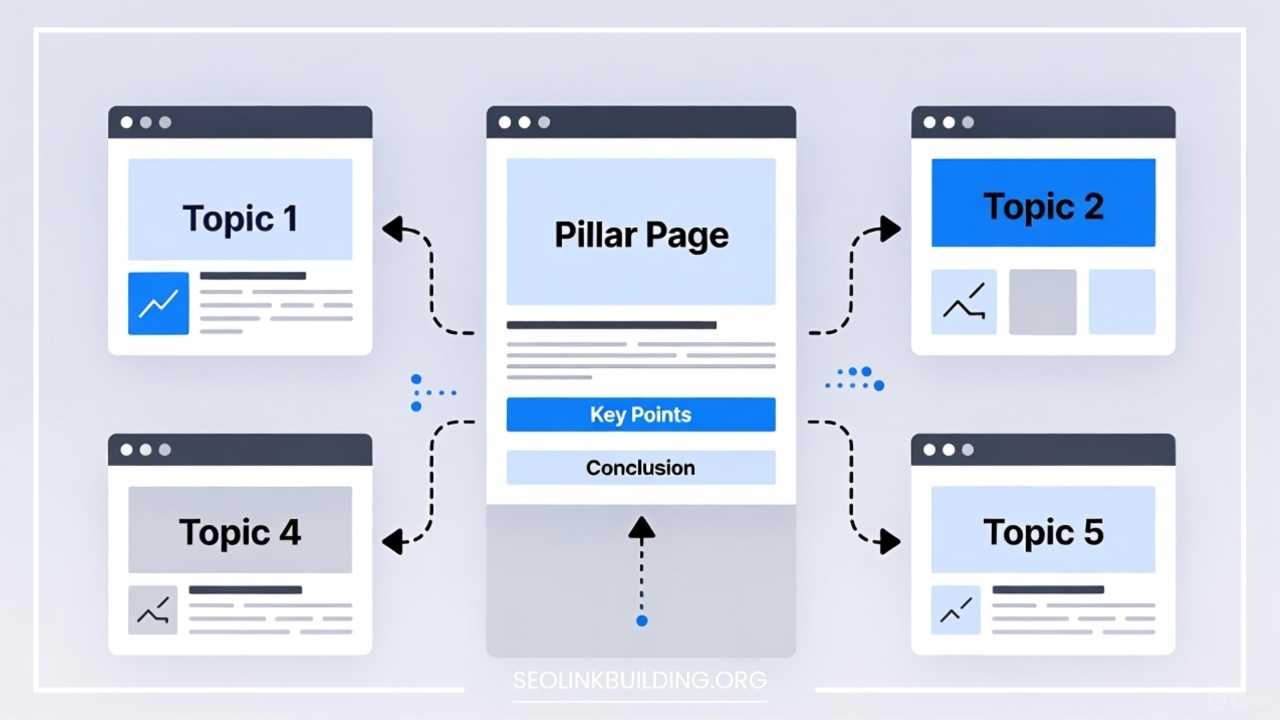
A pillar page is the strategic answer to this demand. It’s a comprehensive, high-level guide on a broad topic, designed to serve as the hub for an entire cluster of related, more detailed content. By implementing pillar pages, you don’t just create individual pieces of content; you build an interconnected, powerful knowledge base.
If your goal is to dominate search rankings for your core business topics, establish your brand as an undeniable industry leader, and guide users effortlessly through your website, then understanding and implementing pillar pages is not optional—it’s essential. Every marketer and content strategist must care about this structure because it fundamentally shifts your content from a scattered collection of articles to a formidable, unified system.
What Is a Pillar Page?
At its core, a pillar page is a comprehensive, resource-rich, and often long-form piece of content (typically 2,000 words or more) that broadly covers a significant, high-level topic. It acts as the anchor page on your website for a specific, vital subject area that directly relates to your business.
Think of it like a textbook chapter or a detailed table of contents. While it provides an in-depth overview, it doesn’t try to cover every single specific detail. Instead, it links out to a topic cluster—a group of related, individual blog posts or articles—that each dive deeply into a subtopic mentioned on the pillar page.
Pillar Pages vs. Regular Blog Posts
The fundamental difference lies in scope and intent:
- Pillar Page: Broad in scope, covering a topic like “Inbound Marketing Strategy.” It’s designed for broad keyword authority and high-level education. It usually lives on a short, easy-to-remember URL (e.g.,
/inbound-marketing-strategy). - Regular Blog Post (Cluster Content): Narrow in scope, covering a highly specific subtopic like “How to Use Instagram Reels for Inbound Marketing.” It’s designed to capture long-tail search traffic and provide a deep dive into a single point.
In practice, a pillar page is often a static resource, designed to be perpetually updated, whereas a regular blog post can be more time-sensitive or tactical.
Examples of Pillar Pages in Practice
A B2B software company focused on customer relationship management (CRM) might have the following pillar page and corresponding cluster content:
- Pillar Page Topic: “The Ultimate Guide to Customer Relationship Management (CRM)”
- Cluster Content Examples:
- “Choosing the Right CRM for Small Businesses”
- “10 Essential CRM Features for Sales Teams”
- “Integrating CRM with Marketing Automation Software”
- “Best Practices for CRM Data Cleansing”
Every single piece of cluster content links back to the main CRM Pillar Page, and the Pillar Page links out to every piece of cluster content, creating a complete, interconnected web of authority.
Types of Pillar Pages
While the basic structure remains consistent, pillar pages often fall into two main categories:
- Topic Pillars (Resource Pillars): These are the most common. They focus on a comprehensive educational topic, like the CRM example above. They are heavily SEO-driven, aiming to capture informational search intent.
- Service/Product Pillars (Landing Page Pillars): These are focused on a specific core offering or category of products. They still contain significant educational content, but their primary goal is to guide the user toward a conversion (e.g., a “Complete Guide to Accounting Software” which extensively features the company’s own product as a solution).
Benefits of Pillar Pages
Implementing a pillar page and topic cluster strategy is a transformative move for your content operation, yielding substantial benefits across SEO, user experience, and business growth.
Improves Site Structure and User Experience
A pillar page strategy creates a clear, logical hierarchy for your website’s content. This structure is easily understood by both users and search engine crawlers.
- For Users: Instead of getting lost in a maze of blog posts, users interested in a topic like “project management” land on the comprehensive Pillar Page. They can either absorb the high-level summary or click a relevant link in the table of contents to dive into a specific, detailed subtopic. This seamless navigation vastly improves the user experience (UX).
- For Crawlers: Search engine bots efficiently crawl the clear, interlinked structure, understanding the relationship between the broad pillar and the deep cluster articles.
Boosts SEO Through Internal Linking and Topic Clusters
This is arguably the most powerful benefit. The topic cluster model—where all subtopic pages link back to the pillar, and the pillar links out to them—is an explicit signal to Google.
- Signal of Authority: By tightly linking all related content, you consolidate link equity. When one piece of cluster content performs well and earns a backlink, a portion of that authority is passed back to the pillar page. This synergy tells Google: “This brand is the definitive authority on this entire subject.”
- Ranking for Broader Terms: This combined authority allows your pillar page to rank for highly competitive, broad head terms (e.g., “Content Marketing”) that would be nearly impossible to rank for with a single, average-length blog post.
Positions Your Brand as an Authority
Pillar pages are not thin content; they are exhaustive resources. Publishing a high-quality, 3,000+ word resource on a foundational industry topic instantly elevates your brand’s perceived expertise, authoritativeness, and trustworthiness (E-A-T)—crucial factors in Google’s ranking algorithms. A pillar page becomes the definitive, go-to guide that prospects bookmark and share.
Enhances Content Discoverability and Traffic
With a clear structure and consolidated authority, your pillar page starts to rank well, acting as a massive magnet for organic traffic. This magnet doesn’t just attract people to the pillar; it also distributes traffic to the linked cluster content, ensuring all your related articles get discovered and read. This increases overall site engagement and page views.
Supports Lead Generation and Conversions
Due to their educational and comprehensive nature, pillar pages are excellent vehicles for lead generation. You can implement content upgrades (e.g., “Download a free PDF checklist from this guide,” “Access the advanced toolkit”) directly on the pillar page, converting highly interested, mid-funnel users into qualified leads. For product-focused pillars, the educational content naturally guides the user toward the solution your product offers.
Pillar Pages vs. Cornerstone Content
The terms Pillar Page and Cornerstone Content are often used interchangeably, leading to confusion. While they share the goal of creating high-quality, foundational content, their underlying structural purpose is different.
| Feature | Pillar Page | Cornerstone Content |
| Primary Goal | Organize content into topic clusters; establish broad topic authority. | Showcase the absolute best, most important content; establish E-A-T. |
| Scope | Broad topic overview; acts as a table of contents to subpages. | Deep dive into a single, high-value, high-impact topic. |
| Structure/Role | Hub that links out to many sub-pages, which link back in a closed loop (Topic Cluster). | Authority page that attracts the most internal links from all related pages across the site. |
| Typical Format | Often a resource page with a table of contents and many internal jump links. | Often a highly polished, deep-dive guide or tutorial. |
| Keyword Focus | Broad head terms (e.g., Inbound Marketing). | Important, high-volume, mid-tail terms (e.g., Inbound Marketing Checklist). |
Clarifying the Difference
- Cornerstone Content is the best content on your site. If a user only read one thing from you, this is what you’d want it to be. Its purpose is quality and depth on a critical topic. You use internal linking to push maximum authority to this single page.
- Pillar Pages are a structural element of the Topic Cluster Model. Their purpose is organization and consolidating authority across a group of related content. You use two-way linking to create a tight network between the pillar and its many cluster pages.
When to Use One vs. the Other
- Use a Pillar Page when you have a vast amount of existing content (20+ related blog posts) that needs to be organized, unified, and presented under a single, authoritative topic umbrella. This is a strategy for creating systemic topic authority.
- Use Cornerstone Content when you have a small number of critically important topics and want to ensure those few pages receive the maximum amount of internal link juice to rank them as highly as possible.
In many modern strategies, the best pillar pages also serve as cornerstone content. A well-executed pillar page is, by definition, one of the most comprehensive and important pieces of content on your site, making the distinction often academic. Focus on the topic cluster structure first, and the pillar page naturally assumes a cornerstone role.
How to Create a Pillar Page
Creating a successful pillar page is a six-step process that moves from strategic topic selection to ongoing maintenance. It requires research, meticulous planning, and a robust internal linking strategy.
Step 1: Choose a Core Topic
The success of your pillar page hinges entirely on the topic you choose. It must be broad, relevant, and directly align with your business offerings and audience’s main pain points.
- Keyword Research: Start with a tool like SEMrush or Ahrefs. Look for high-volume, broad keywords (e.g., “social media marketing,” “financial planning”) that are too difficult to rank for with a single blog post. This is your core pillar topic.
- Search Intent: The search intent for your pillar topic must be primarily informational. Users searching for “inbound marketing” are looking for a complete guide, not a transaction.
- Audience Fit: Ensure the topic is one your target audience genuinely cares about and one where you can authentically establish authority.
Step 2: Plan Supporting Cluster Content
Once the core topic is selected, you must identify all the subtopics that branch off from it. These subtopics will form your cluster content.
- Audit Existing Content: List all existing blog posts and articles related to the pillar topic. These become your initial cluster pages.
- Identify Gaps: Look at the top-ranking pillar pages for your chosen topic. What do they cover that you don’t? Use Google’s “People also ask” and related searches to brainstorm missing subtopics.
- Outline the Clusters: Each major subtopic in your pillar outline should correspond to at least one (and ideally several) dedicated cluster posts. For example, under the “Email Marketing” section of your “Inbound Marketing” pillar, you might have cluster posts on “A/B Testing Subject Lines,” “Segmenting Your Email List,” and “Email Deliverability Best Practices.”
Step 3: Structure Your Pillar Page
The pillar page must be designed for scannability and depth. Given its length, structure is paramount.
- Compelling Title: Use a title that clearly promises a comprehensive guide (e.g., “The Ultimate Guide,” “Everything You Need to Know,” “The Complete Blueprint”).
- Introduction: Hook the reader and explain what they will learn and why it matters.
- Table of Contents (TOC): A linked, anchor-text TOC at the top is non-negotiable. It allows users and crawlers to jump directly to sections, significantly improving UX and page SEO.
- Body Sections: Use clear, nested headings (
H2,H3,H4) for each major section and subsection. Each section provides a high-level summary of a subtopic, serving as the entry point to the cluster content. - Conversion Points: Include relevant, non-intrusive CTAs and lead magnets throughout the page.
Step 4: Internal Linking Strategy
The linking structure is what creates the “cluster” and consolidates SEO authority. It must be two-way.
- Pillar to Cluster: Within the relevant section of the pillar, provide a brief summary of the subtopic, followed by a clear, keyword-rich link to the dedicated cluster article (e.g., “To read a deep dive on optimizing your subject lines, see our guide on A/B Testing Email Subject Lines“).
- Cluster to Pillar (The Crucial Step): Every single cluster article must link back to the main pillar page. This link should be placed near the beginning or in the most contextually relevant spot, using the pillar page’s primary target keyword as the anchor text (e.g., linking the phrase “inbound marketing strategy” back to the pillar). This link ensures link equity flows back to the main authority page.
Step 5: Optimize for SEO
Treat your pillar page like the critical SEO asset it is.
- Meta Tags: Write a clear, keyword-focused meta title and description that encourages clicks.
- Schema Markup: Implement relevant schema (e.g.,
HowTo,Article,FAQ) to earn rich snippets and improve search engine understanding. - Keyword Usage: Use the primary target keyword naturally in the title, URL, H1, H2s, and throughout the text. Also, include semantic keywords and related phrases to ensure comprehensive coverage.
- Visuals: Utilize images, charts, infographics, and videos to break up text and increase engagement. Ensure all visuals have descriptive alt text.
Step 6: Promote and Update Regularly
A pillar page is a long-term investment, not a one-off campaign.
- Initial Promotion: Share the link aggressively across all channels: social media, email newsletters, paid advertising, and link it from your main website navigation.
- Continuous Updates: Set a recurring calendar reminder (e.g., every 6 months) to review and update the pillar content. Update statistics, refresh examples, and ensure all links are current. Add summaries of new cluster content as you publish it.
Examples of Effective Pillar Pages
Looking at successful examples can crystallize the pillar page concept. High-performing pillar pages are usually recognizable by their depth, structure, and seamless navigation.
Example 1: HubSpot’s Inbound Marketing Pillar
HubSpot, the originator and champion of the topic cluster model, has an exemplary pillar page on Inbound Marketing.
- Why it works:
- Structure: It features a massive, well-organized table of contents that allows users to instantly navigate to any of the 15+ major sections.
- Content Depth: It is not just a summary; it is a full, high-quality guide in itself.
- Interlinking: Each section contains a brief summary and a clear link-out to a dedicated cluster post (e.g., a full guide on Blogging for Inbound Marketing).
- Lead Generation: The content is gated by a simple form on the side for the “full PDF download,” turning highly engaged readers into leads.
Example 2: NerdWallet’s Credit Cards Guide
NerdWallet, a major finance publisher, uses pillar pages to rank for competitive financial terms. Their Credit Card Guide is a superb example of a service/product pillar.
- Why it works:
- Focus: It answers virtually every question a user might have about credit cards, from “how to apply” to “best rewards programs.”
- Real-time Data: It incorporates dynamic, real-time data tables of various credit cards, making the page perpetually relevant and useful.
- User Intent: It perfectly balances educational content with transactional intent, guiding the educated user to their recommended product partners.
- Authority Signal: The sheer breadth of content and the consistent quality of the writing signal massive domain authority in the financial space.
Effective pillar pages are visually appealing, easy to read, and demonstrate a clear hierarchy. They are always more than just a list of links; they are high-value, self-contained educational resources.
Common Mistakes to Avoid
While the strategy is powerful, poor execution can undermine your efforts. Marketers should be mindful of several common pitfalls when creating pillar pages.
Making the Pillar Too Short or Too Shallow
A pillar page is meant to be a comprehensive resource. A page under 1,500 words is often perceived by search engines as too shallow to warrant broad topic authority.
- The Fix: Ensure your pillar provides genuine, high-level educational value. If you can’t write at least 2,500 words of substantive overview content, your topic might be too narrow, or your research is incomplete.
Overstuffing Keywords
Trying to rank for a major head term often leads to the temptation of unnaturally repeating the keyword. Modern SEO rewards natural language and semantic relevance.
- The Fix: Focus on covering the topic comprehensively. Use semantic keywords (related words and phrases) rather than repeating the exact target keyword. Tools like SurferSEO can help ensure natural keyword density and coverage of related entities.
Poor Internal Linking
Failing to establish the clear, two-way link relationship is the single biggest failure of the topic cluster model.
- The Fix: Audit your links. Ensure every cluster article links back to the pillar using the pillar’s target keyword as the anchor text. Also, ensure the pillar links out to every cluster article. The cluster must be a closed, tight loop.
Neglecting Updates Over Time
Because they are comprehensive guides, pillar pages are more susceptible to becoming outdated than tactical blog posts.
- The Fix: Treat the pillar page as a living document. Schedule quarterly or semi-annual reviews to check for broken links, outdated statistics, and missing new industry developments. A well-maintained pillar reinforces authority.
Ignoring User Experience
If the pillar page is a wall of text without a clear Table of Contents, subheadings, or visuals, users will bounce, signaling to Google that the content is low-quality despite its length.
- The Fix: Prioritize readability. Use a clean, mobile-responsive layout, large font sizes, plenty of white space, and, most importantly, a functional, linked Table of Contents.
Pillar Pages and SEO: How They Help
The topic cluster model, anchored by the pillar page, provides distinct and powerful advantages within the search environment.
Role in Topic Clusters
The pillar page is the organizational map for the topic cluster. It formalizes the relationship between broad topics and specific subtopics. This structure allows the combined authority (link equity) of the cluster pages to flow to the main pillar, and, conversely, the authority of the pillar to reinforce the cluster pages. This is known as link equity distribution. When a search engine crawls this highly-organized web, it instantly understands the website’s deep, organized coverage of the entire subject.
Improving Search Rankings for Broader Keywords
Ranking for a highly competitive head term (e.g., “marketing strategy”) is almost impossible with a stand-alone blog post. A pillar page changes this equation. By consolidating the authority of 20 or 30 highly specific, deep-dive cluster articles, the pillar page builds the required trust and relevance to compete. Google sees the content not as one page, but as a complete, authoritative ecosystem dedicated to the topic.
Increasing Dwell Time and Lowering Bounce Rate
When a user lands on a pillar page, they are presented with an exhaustive guide and an easy-to-use Table of Contents. This immediate sense of finding a complete answer encourages them to stay on the page longer (high dwell time) and navigate internally to related cluster content instead of leaving the site (low bounce rate). These behavioral metrics are strong positive signals to Google about the quality and relevance of the content.
Enhancing Crawlability for Search Engines
The consistent, deep internal linking structure makes it exceptionally easy for search engine spiders to discover and index all related content. This systematic linking prevents content from being orphaned and ensures that link equity is passed efficiently across the site, leading to faster indexing and better overall SEO performance.
Tools & Resources to Build Pillar Pages
A robust tech stack can streamline the pillar page creation process, from research to publication and tracking.
SEO Tools
These are essential for topic discovery and optimization:
- SEMrush / Ahrefs: For identifying high-volume, low-competition pillar topics, auditing existing content, and analyzing competitors’ top-performing pillar pages and clusters. They are also crucial for anchor text and backlink analysis.
- SurferSEO / Clearscope: These tools help ensure your content is comprehensively covering the topic by suggesting related terms and questions to include, helping you avoid shallow content.
Content Management Platforms
The platform you use must handle the required length and structure:
- WordPress: Highly flexible, with plugins that facilitate creating linked Tables of Contents and clear internal linking.
- HubSpot CMS: Built with the Topic Cluster model in mind, it provides explicit reporting and visualization tools for the pillar/cluster relationship, making management easier.
Analytics
Tracking the performance of your pillar page is crucial for proving ROI:
- Google Analytics (GA4): Track key metrics like unique page views, bounce rate, dwell time, and conversion rates (e.g., lead form submissions) on the pillar page.
- Google Search Console (GSC): Monitor which specific search queries the pillar page is ranking for and where it is earning rich snippets. Use the Links report to verify the flow of internal link equity.
Templates and Guides
Many platforms offer free pillar page templates (often for WordPress or HubSpot) that provide a pre-designed structure for the TOC, headings, and internal link placeholders, saving significant time in the design phase.
Final Thoughts
The pillar page is far more than a long article; it is the strategic backbone of a modern, successful content marketing strategy. By serving as the authoritative hub for a topic cluster, it fixes the chaos of disorganized content, significantly improves SEO authority, and provides an unparalleled user experience.
Pillar pages are not a quick fix; they are a long-term investment that requires meticulous planning, deep research, and ongoing maintenance. However, the reward—dominating competitive search terms, establishing undeniable brand authority, and generating consistent, high-quality traffic—makes the effort profoundly worthwhile.
If you are currently publishing scattered blog posts, you are leaving massive SEO potential on the table. It is time to audit your existing content, identify your core topics, and begin building the interconnected pillar pages that will transform your website into an authoritative knowledge center.